Yep, we may get a tiny thank-you (read: commission) when you buy through
links on Autologr — not enough for a yacht, but enough to keep the lights (and
servers) on.
Learn more
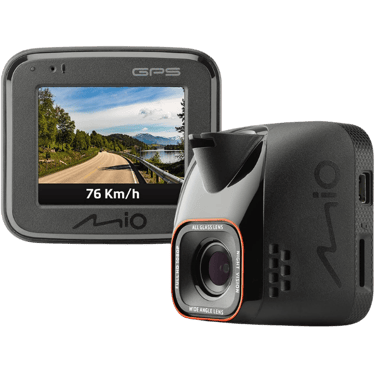
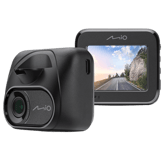
Still unsure which dash cam to grab? The Mio MiVue C570 might be it — with 127 standout specs & performance (including built-in display, display size, display type & touchscreen) that drivers love.
A fast snapshot of the Mio MiVue C570, covering its standout specification and what you can expect right out of the box.
Mio MiVue C570
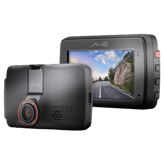
Mio MiVue C570 is a reliable dash cam designed for drivers who want clear Full HD recording with added safety features. It uses a Sony STARVIS sensor to deliver strong image quality, especially in low-light conditions, along with a wide viewing angle for better road coverage. With built-in GPS and optional parking mode, it provides dependable performance for both everyday use and longer journeys.
Quick Specs Breakdown
The key specs that actually matter—no fluff, no guesswork
Here’s a streamlined view of the Mio MiVue C570 key specifications. Compare critical features at a glance before exploring the full specs and hands-on insights below.
Display & Interface
Built-in Display
Does it have a built-in display?
Yes
Display Size
What is the display size?
2 inch
Display Type
What type of display does it use?
LCD
Touchscreen
Is the display touchscreen-enabled?
Yes
Connectivity & Smart Features
GPS Module
Does it have GPS?
Yes
Driver Assistance Alerts
Are driver assistance alerts included?
Yes
Storage & File Management
Maximum Supported Storage
What is the maximum supported storage?
128 GB
General Information
Device Type
What type of device is this?
Dash Cam
Camera Configuration
What camera configuration does it use?
Front
Expandable Storage
Does it support expandable storage?
Yes
Maintenance, Updates & Ownership
Warranty Length
What is the warranty length?
2 Years
Specifications & Facts
127
Specs measured. Drama avoided.
Is the Mio MiVue C570 the best choice in its class? You’ll find out here with full specs, comparisons to similar dash cams, and opinions from the community.
Dash Cam in this range
Who knows?
(Help us out by suggesting one!)
Mio MiVue C570
This dash cam is designed for multiple purposes including accident documentation, security surveillance, and driving behavior tracking.
Explains the main reason for recording video footage.
Don’t keep it to yourself — be the first to react and review the
Recording Purpose on Mio MiVue C570
◉ and help others decide!
Mio MiVue C570
Release Year
What year was it released?
0
Mio MiVue C570
0
Votes
2019
Dash Cam in this range
Who knows?
(Help us out by suggesting one!)
Mio MiVue C570
This dash cam was released in the year 2019.
Indicates the year the product model was released.
Don’t keep it to yourself — be the first to react and review the
Release Year on Mio MiVue C570
◉ and help others decide!
Mio MiVue C570
Operating Temperature Range
What temperature range does it support?
0
Mio MiVue C570
0
Votes
14°F to 140°F
Dash Cam in this range
Who knows?
(Help us out by suggesting one!)
Mio MiVue C570
Operating temperature ranges from 14°F to 140°F (approximately -10°C to 60°C), allowing reliable use in typical vehicle environments including hot summers and mild cold.
Defines the temperature range where the dash cam operates reliably.
Don’t keep it to yourself — be the first to react and review the
Operating Temperature Range on Mio MiVue C570
◉ and help others decide!
Mio MiVue C570
Installation Location
Where is the dash cam installed?
0
Mio MiVue C570
0
Votes
Front Windshield, Dashboard
Dash Cam in this range
Who knows?
(Help us out by suggesting one!)
Indicates the physical installation position inside the vehicle.
Don’t keep it to yourself — be the first to react and review the
Installation Location on Mio MiVue C570
◉ and help others decide!
Mio MiVue C570
Usage Mode
What is the intended usage mode?
0
Mio MiVue C570
0
Votes
Personal
Dash Cam in this range
Who knows?
(Help us out by suggesting one!)
Defines the primary usage scenario for the device.
Don’t keep it to yourself — be the first to react and review the
Usage Mode on Mio MiVue C570
◉ and help others decide!
Mio MiVue C570
Target User Type
Who is this dash cam for?
0
Mio MiVue C570
0
Votes
Daily Driver, Security-Conscious User
Dash Cam in this range
Who knows?
(Help us out by suggesting one!)
Defines the primary user profile the dash cam is designed for.
Don’t keep it to yourself — be the first to react and review the
Target User Type on Mio MiVue C570
◉ and help others decide!
Mio MiVue C570
Operating Mode
How does the dash cam operate?
0
Mio MiVue C570
0
Votes
Standalone
Dash Cam in this range
Who knows?
(Help us out by suggesting one!)
Describes how the dash cam operates and is managed.
Don’t keep it to yourself — be the first to react and review the
Operating Mode on Mio MiVue C570
◉ and help others decide!
Dash Cam in this range
Who knows?
(Help us out by suggesting one!)
Supports compliance with local recording and privacy laws.
Don’t keep it to yourself — be the first to react and review the
Legal Compliance Mode on Mio MiVue C570
◉ and help others decide!
Mio MiVue C570
Removable Unit
Is the dash cam removable?
Yes
0Votes
Mio MiVue C570
Dash Cam in this range
Who knows?
(Help us out by suggesting one!)
Indicates whether the main unit can be easily removed.
Don’t keep it to yourself — be the first to react and review the
Removable Unit on Mio MiVue C570
◉ and help others decide!
Mio MiVue C570
Modular Design
Does it have a modular design?
No
0Votes
Mio MiVue C570
Dash Cam in this range
Who knows?
(Help us out by suggesting one!)
Specifies whether components can be added or replaced separately.
Don’t keep it to yourself — be the first to react and review the
Modular Design on Mio MiVue C570
◉ and help others decide!
Mio MiVue C570
Weather Resistance Rating
What weather resistance rating does it have?
0
Mio MiVue C570
0
Votes
Heat Resistant
Dash Cam in this range
Who knows?
(Help us out by suggesting one!)
Describes the device’s ability to withstand environmental conditions such as heat, cold, or humidity.
Don’t keep it to yourself — be the first to react and review the
Weather Resistance Rating on Mio MiVue C570
◉ and help others decide!
Video & Recording Performance
17
Mio MiVue C570
Loop Recording
Does it support loop recording?
Yes
0Votes
Mio MiVue C570
Dash Cam in this range
Who knows?
(Help us out by suggesting one!)
Mio MiVue C570
Loop recording is supported, meaning the camera will overwrite the oldest footage when the storage is full, allowing continuous recording without manual intervention.
Automatically overwrites old footage when storage is full.
Don’t keep it to yourself — be the first to react and review the
Loop Recording on Mio MiVue C570
◉ and help others decide!
Mio MiVue C570
Emergency Recording
Is emergency recording supported?
Yes
0Votes
Mio MiVue C570
Dash Cam in this range
Who knows?
(Help us out by suggesting one!)
Mio MiVue C570
Emergency recording mode is enabled to capture critical events automatically when triggered by impact or sudden changes.
Locks footage during detected incidents.
Don’t keep it to yourself — be the first to react and review the
Emergency Recording on Mio MiVue C570
◉ and help others decide!
Mio MiVue C570
Continuous Recording
Can it record continuously?
Yes
0Votes
Mio MiVue C570
Dash Cam in this range
Who knows?
(Help us out by suggesting one!)
Mio MiVue C570
Continuous recording is supported, so the dash cam can automatically record without manual control for uninterrupted footage.
Indicates support for uninterrupted recording sessions.
Don’t keep it to yourself — be the first to react and review the
Continuous Recording on Mio MiVue C570
◉ and help others decide!
Mio MiVue C570
Parking Recording Mode
Does it record while parked?
Yes
0Votes
Mio MiVue C570
Dash Cam in this range
Who knows?
(Help us out by suggesting one!)
Mio MiVue C570
Parking recording mode is available, enabling surveillance and incident recording while the vehicle is parked.
Enables recording while the vehicle is parked.
Don’t keep it to yourself — be the first to react and review the
Parking Recording Mode on Mio MiVue C570
◉ and help others decide!
Mio MiVue C570
Audio Recording
Does it record audio?
Yes
0Votes
Mio MiVue C570
Dash Cam in this range
Who knows?
(Help us out by suggesting one!)
Mio MiVue C570
Audio recording is enabled, allowing the dash cam to capture sound along with the video. This is useful for documenting conversations or ambient noises during incidents.
Captures in-cabin audio alongside video.
Don’t keep it to yourself — be the first to react and review the
Audio Recording on Mio MiVue C570
◉ and help others decide!
Mio MiVue C570
Audio Recording Disable Option
Can audio recording be disabled?
Yes
0Votes
Mio MiVue C570
Dash Cam in this range
Who knows?
(Help us out by suggesting one!)
Mio MiVue C570
The audio recording disable option allows muting of sound recording for privacy or compliance reasons.
Allows users to turn off audio recording.
Don’t keep it to yourself — be the first to react and review the
Audio Recording Disable Option on Mio MiVue C570
◉ and help others decide!
Mio MiVue C570
Front Camera Resolution
What is the front camera resolution?
0
Mio MiVue C570
0
Votes
1080p
Dash Cam in this range
Who knows?
(Help us out by suggesting one!)
Specifies the video resolution of the front-facing camera.
Don’t keep it to yourself — be the first to react and review the
Front Camera Resolution on Mio MiVue C570
◉ and help others decide!
Mio MiVue C570
Front Frame Rate
What is the front camera frame rate?
30
Hz
0Votes
Dash Cam in this range
Who knows?
(Help us out by suggesting one!)
Measures how smoothly the front camera records motion.
Don’t keep it to yourself — be the first to react and review the
Front Frame Rate on Mio MiVue C570
◉ and help others decide!
Mio MiVue C570
Video Codec
What video codec is used?
0
Mio MiVue C570
0
Votes
H.264
Dash Cam in this range
Who knows?
(Help us out by suggesting one!)
Defines the compression format used for video files.
Don’t keep it to yourself — be the first to react and review the
Video Codec on Mio MiVue C570
◉ and help others decide!
Mio MiVue C570
HDR
Does it support HDR?
No
0Votes
Mio MiVue C570
Dash Cam in this range
Who knows?
(Help us out by suggesting one!)
Indicates support for High Dynamic Range video.
Don’t keep it to yourself — be the first to react and review the
HDR on Mio MiVue C570
◉ and help others decide!
Mio MiVue C570
WDR
Does it support WDR?
Yes
0Votes
Mio MiVue C570
Dash Cam in this range
Who knows?
(Help us out by suggesting one!)
Enhances visibility in mixed lighting conditions.
Don’t keep it to yourself — be the first to react and review the
WDR on Mio MiVue C570
◉ and help others decide!
Mio MiVue C570
Night Vision Mode
Does it have night vision?
Yes
0Votes
Mio MiVue C570
Dash Cam in this range
Who knows?
(Help us out by suggesting one!)
Enables improved recording in low-light conditions.
Don’t keep it to yourself — be the first to react and review the
Night Vision Mode on Mio MiVue C570
◉ and help others decide!
Mio MiVue C570
Infrared Night Vision
Does it support infrared night vision?
No
0Votes
Mio MiVue C570
Dash Cam in this range
Who knows?
(Help us out by suggesting one!)
Uses infrared LEDs for interior or low-light recording.
Don’t keep it to yourself — be the first to react and review the
Infrared Night Vision on Mio MiVue C570
◉ and help others decide!
Mio MiVue C570
Low-Light Enhancement
Is low-light enhanced?
Yes
0Votes
Mio MiVue C570
Dash Cam in this range
Who knows?
(Help us out by suggesting one!)
Improves video clarity in dark environments.
Don’t keep it to yourself — be the first to react and review the
Low-Light Enhancement on Mio MiVue C570
◉ and help others decide!
Mio MiVue C570
Dual Recording
Does it support dual recording?
No
0Votes
Mio MiVue C570
Dash Cam in this range
Who knows?
(Help us out by suggesting one!)
Allows simultaneous front and rear recording.
Don’t keep it to yourself — be the first to react and review the
Dual Recording on Mio MiVue C570
◉ and help others decide!
Mio MiVue C570
Triple Channel Recording
Does it support triple recording?
No
0Votes
Mio MiVue C570
Dash Cam in this range
Who knows?
(Help us out by suggesting one!)
Supports front, rear, and interior recording together.
Don’t keep it to yourself — be the first to react and review the
Triple Channel Recording on Mio MiVue C570
◉ and help others decide!
Mio MiVue C570
Time-Lapse Recording
Is time-lapse recording available?
No
0Votes
Mio MiVue C570
Dash Cam in this range
Who knows?
(Help us out by suggesting one!)
Captures frames at intervals to save storage.
Don’t keep it to yourself — be the first to react and review the
Time-Lapse Recording on Mio MiVue C570
◉ and help others decide!
Camera & Lens System
11
Mio MiVue C570
Front Lens Field of View
What is the front lens field of view?
150
degree
0Votes
Dash Cam in this range
Who knows?
(Help us out by suggesting one!)
Mio MiVue C570
The front lens field of view is 150 degrees, wide enough to capture substantial road coverage for effective incident recording.
Indicates how wide the front camera can capture the road.
Don’t keep it to yourself — be the first to react and review the
Front Lens Field of View on Mio MiVue C570
◉ and help others decide!
Mio MiVue C570
Focus Type
What focus type does it use?
0
Mio MiVue C570
0
Votes
Fixed
Dash Cam in this range
Who knows?
(Help us out by suggesting one!)
Mio MiVue C570
Focus type is fixed, meaning the lens has a set focus range designed to keep both close and distant objects clear without manual adjustment.
Describes how the camera focuses on objects.
Don’t keep it to yourself — be the first to react and review the
Focus Type on Mio MiVue C570
◉ and help others decide!
Mio MiVue C570
Sensor Type
What sensor type is used?
0
Mio MiVue C570
0
Votes
CMOS
Dash Cam in this range
Who knows?
(Help us out by suggesting one!)
Mio MiVue C570
Uses a CMOS sensor for image capture, known for good light sensitivity and low power consumption.
Identifies the imaging sensor technology used.
Don’t keep it to yourself — be the first to react and review the
Sensor Type on Mio MiVue C570
◉ and help others decide!
Mio MiVue C570
Image Stabilization
Is image stabilization supported?
Yes
0Votes
Mio MiVue C570
Dash Cam in this range
Who knows?
(Help us out by suggesting one!)
Mio MiVue C570
Image stabilization is included to reduce blur caused by vibrations or movement, improving footage clarity.
Helps reduce shake and vibration in recorded footage.
Don’t keep it to yourself — be the first to react and review the
Image Stabilization on Mio MiVue C570
◉ and help others decide!
Mio MiVue C570
Lens Type
What type of lens is used?
0
Mio MiVue C570
0
Votes
Glass
Dash Cam in this range
Who knows?
(Help us out by suggesting one!)
Mio MiVue C570
The lens is made of glass, typically offering better image clarity and durability compared to plastic.
Specifies the material and construction of the lens.
Don’t keep it to yourself — be the first to react and review the
Lens Type on Mio MiVue C570
◉ and help others decide!
Mio MiVue C570
Adjustable Lens Angle
Is the lens angle adjustable?
Yes
0Votes
Mio MiVue C570
Dash Cam in this range
Who knows?
(Help us out by suggesting one!)
Mio MiVue C570
The lens angle is adjustable, giving flexibility to set the optimal viewing angle depending on the vehicle setup.
Indicates whether the lens angle can be manually adjusted.
Don’t keep it to yourself — be the first to react and review the
Adjustable Lens Angle on Mio MiVue C570
◉ and help others decide!
Mio MiVue C570
Distortion Correction
Does it correct lens distortion?
Yes
0Votes
Mio MiVue C570
Dash Cam in this range
Who knows?
(Help us out by suggesting one!)
Mio MiVue C570
Distortion correction is built-in, reducing image warping to produce clearer and more accurate footage.
Reduces fisheye or edge distortion in wide-angle footage.
Don’t keep it to yourself — be the first to react and review the
Distortion Correction on Mio MiVue C570
◉ and help others decide!
Mio MiVue C570
Lens Aperture
What is the lens aperture?
0
Mio MiVue C570
0
Votes
F1.8
Dash Cam in this range
Who knows?
(Help us out by suggesting one!)
Describes the lens opening size affecting low-light performance.
Don’t keep it to yourself — be the first to react and review the
Lens Aperture on Mio MiVue C570
◉ and help others decide!
Mio MiVue C570
Anti-Glare Coating
Does it have anti-glare coating?
No
0Votes
Mio MiVue C570
Dash Cam in this range
Who knows?
(Help us out by suggesting one!)
Minimizes reflections and glare on the lens surface.
Don’t keep it to yourself — be the first to react and review the
Anti-Glare Coating on Mio MiVue C570
◉ and help others decide!
Mio MiVue C570
Polarizing Filter
Does it support a polarizing filter?
No
0Votes
Mio MiVue C570
Dash Cam in this range
Who knows?
(Help us out by suggesting one!)
Supports optional CPL filters to reduce reflections.
Don’t keep it to yourself — be the first to react and review the
Polarizing Filter on Mio MiVue C570
◉ and help others decide!
Mio MiVue C570
Front Sensor Model
What is the front sensor model?
0
Mio MiVue C570
0
Votes
Sony STARVIS
Dash Cam in this range
Who knows?
(Help us out by suggesting one!)
Specifies the image sensor model used for the front camera.
Don’t keep it to yourself — be the first to react and review the
Front Sensor Model on Mio MiVue C570
◉ and help others decide!
Dash Cam in this range
Who knows?
(Help us out by suggesting one!)
Mio MiVue C570
Driver assistance alerts help promote safer driving by warning the driver of certain hazardous situations.
Provides alerts related to driving behavior or road conditions.
Don’t keep it to yourself — be the first to react and review the
Driver Assistance Alerts on Mio MiVue C570
◉ and help others decide!
Mio MiVue C570
GPS Speed Logging
Does it log driving speed?
Yes
0Votes
Mio MiVue C570
Dash Cam in this range
Who knows?
(Help us out by suggesting one!)
Mio MiVue C570
GPS speed logging is active, augmenting videos with speed data for comprehensive incident records.
Records vehicle speed data alongside video footage.
Don’t keep it to yourself — be the first to react and review the
GPS Speed Logging on Mio MiVue C570
◉ and help others decide!
Mio MiVue C570
GPS Location Logging
Does it log GPS location?
Yes
0Votes
Mio MiVue C570
Dash Cam in this range
Who knows?
(Help us out by suggesting one!)
Mio MiVue C570
Precise GPS location logging enriches footage with location data for better event context.
Captures location coordinates with recorded footage.
Don’t keep it to yourself — be the first to react and review the
GPS Location Logging on Mio MiVue C570
◉ and help others decide!
Mio MiVue C570
Wi-Fi Connectivity
Does it support Wi-Fi?
No
0Votes
Mio MiVue C570
Dash Cam in this range
Who knows?
(Help us out by suggesting one!)
Indicates whether the dash cam supports Wi-Fi connectivity.
Don’t keep it to yourself — be the first to react and review the
Wi-Fi Connectivity on Mio MiVue C570
◉ and help others decide!
Mio MiVue C570
Bluetooth Connectivity
Does it support Bluetooth?
No
0Votes
Mio MiVue C570
Dash Cam in this range
Who knows?
(Help us out by suggesting one!)
Enables short-range wireless communication with other devices.
Don’t keep it to yourself — be the first to react and review the
Bluetooth Connectivity on Mio MiVue C570
◉ and help others decide!
Mio MiVue C570
Mobile App Support
Is there a mobile app?
No
0Votes
Mio MiVue C570
Dash Cam in this range
Who knows?
(Help us out by suggesting one!)
Indicates compatibility with a companion mobile application.
Don’t keep it to yourself — be the first to react and review the
Mobile App Support on Mio MiVue C570
◉ and help others decide!
Mio MiVue C570
Cloud Connectivity
Does it support cloud connectivity?
No
0Votes
Mio MiVue C570
Dash Cam in this range
Who knows?
(Help us out by suggesting one!)
Allows footage upload and access via cloud services.
Don’t keep it to yourself — be the first to react and review the
Cloud Connectivity on Mio MiVue C570
◉ and help others decide!
Mio MiVue C570
Live View via App
Can you view live footage in the app?
No
0Votes
Mio MiVue C570
Dash Cam in this range
Who knows?
(Help us out by suggesting one!)
Enables real-time camera viewing through the mobile app.
Don’t keep it to yourself — be the first to react and review the
Live View via App on Mio MiVue C570
◉ and help others decide!
Mio MiVue C570
Video Download via App
Can videos be downloaded via the app?
No
0Votes
Mio MiVue C570
Dash Cam in this range
Who knows?
(Help us out by suggesting one!)
Allows recorded videos to be downloaded directly to a phone.
Don’t keep it to yourself — be the first to react and review the
Video Download via App on Mio MiVue C570
◉ and help others decide!
Mio MiVue C570
Firmware Update Method
How are firmware updates performed?
0
Mio MiVue C570
0
Votes
SD Card
Dash Cam in this range
Who knows?
(Help us out by suggesting one!)
Describes how firmware updates are delivered and installed.
Don’t keep it to yourself — be the first to react and review the
Firmware Update Method on Mio MiVue C570
◉ and help others decide!
Mio MiVue C570
AI Event Detection
Does it use AI event detection?
No
0Votes
Mio MiVue C570
Dash Cam in this range
Who knows?
(Help us out by suggesting one!)
Uses AI to detect incidents like collisions or sudden braking.
Don’t keep it to yourself — be the first to react and review the
AI Event Detection on Mio MiVue C570
◉ and help others decide!
Mio MiVue C570
Smart Notifications
Are smart notifications supported?
No
0Votes
Mio MiVue C570
Dash Cam in this range
Who knows?
(Help us out by suggesting one!)
Sends alerts to the user for important events or incidents.
Don’t keep it to yourself — be the first to react and review the
Smart Notifications on Mio MiVue C570
◉ and help others decide!
Safety, Security & Parking Protection
14
Mio MiVue C570
G-Sensor
Does it have a G-sensor?
Yes
0Votes
Mio MiVue C570
Dash Cam in this range
Who knows?
(Help us out by suggesting one!)
Mio MiVue C570
A G-sensor is included to detect sudden accelerations or collisions, automatically triggering emergency video save functions.
Detects sudden impacts or collisions automatically.
Don’t keep it to yourself — be the first to react and review the
G-Sensor on Mio MiVue C570
◉ and help others decide!
Mio MiVue C570
Collision Detection
Does it detect collisions?
Yes
0Votes
Mio MiVue C570
Dash Cam in this range
Who knows?
(Help us out by suggesting one!)
Mio MiVue C570
Collision detection is active, enabling the dash cam to identify and respond to crashes.
Automatically detects collisions while driving.
Don’t keep it to yourself — be the first to react and review the
Collision Detection on Mio MiVue C570
◉ and help others decide!
Mio MiVue C570
Parking Mode Impact Detection
Does it detect impacts in parking mode?
Yes
0Votes
Mio MiVue C570
Dash Cam in this range
Who knows?
(Help us out by suggesting one!)
Mio MiVue C570
Parking mode impact detection is enabled, so the camera can detect sudden impacts or shocks while parked, triggering recording to capture potential incidents.
Detects impacts while the vehicle is parked.
Don’t keep it to yourself — be the first to react and review the
Parking Mode Impact Detection on Mio MiVue C570
◉ and help others decide!
Mio MiVue C570
Parking Mode Motion Detection
Does it detect motion while parked?
Yes
0Votes
Mio MiVue C570
Dash Cam in this range
Who knows?
(Help us out by suggesting one!)
Mio MiVue C570
Parking mode motion detection is enabled, allowing the camera to start recording if any movement is sensed near the vehicle while parked.
Triggers recording when motion is detected near the vehicle.
Don’t keep it to yourself — be the first to react and review the
Parking Mode Motion Detection on Mio MiVue C570
◉ and help others decide!
Mio MiVue C570
File Lock Protection
Are important files protected?
Yes
0Votes
Mio MiVue C570
Dash Cam in this range
Who knows?
(Help us out by suggesting one!)
Mio MiVue C570
File lock protection is available to safeguard important videos from being overwritten or deleted accidentally.
Protects important footage from being overwritten.
Don’t keep it to yourself — be the first to react and review the
File Lock Protection on Mio MiVue C570
◉ and help others decide!
Mio MiVue C570
Encrypted Video Storage
Is video storage encrypted?
No
0Votes
Mio MiVue C570
Dash Cam in this range
Who knows?
(Help us out by suggesting one!)
Mio MiVue C570
Encrypted video storage is not supported, so videos are stored without additional encryption layers.
Encrypts stored footage for privacy and security.
Don’t keep it to yourself — be the first to react and review the
Encrypted Video Storage on Mio MiVue C570
◉ and help others decide!
Mio MiVue C570
Lane Departure Alert
Does it have lane departure alerts?
Yes
0Votes
Mio MiVue C570
Dash Cam in this range
Who knows?
(Help us out by suggesting one!)
Mio MiVue C570
Lane departure alert helps prevent accidents by warning the driver if the vehicle unintentionally drifts from its lane.
Warns the driver if the vehicle drifts from its lane.
Don’t keep it to yourself — be the first to react and review the
Lane Departure Alert on Mio MiVue C570
◉ and help others decide!
Mio MiVue C570
Forward Collision Warning
Does it provide forward collision warnings?
Yes
0Votes
Mio MiVue C570
Dash Cam in this range
Who knows?
(Help us out by suggesting one!)
Mio MiVue C570
Forward collision warning alerts the driver to possible front-end collisions, enhancing road safety.
Alerts the driver of potential frontal collisions.
Don’t keep it to yourself — be the first to react and review the
Forward Collision Warning on Mio MiVue C570
◉ and help others decide!
Mio MiVue C570
Battery Drain Protection
Is battery drain protection included?
No
0Votes
Mio MiVue C570
Dash Cam in this range
Who knows?
(Help us out by suggesting one!)
Prevents excessive vehicle battery drain.
Don’t keep it to yourself — be the first to react and review the
Battery Drain Protection on Mio MiVue C570
◉ and help others decide!
Mio MiVue C570
Low-Voltage Cutoff
Does it have low-voltage cutoff?
No
0Votes
Mio MiVue C570
Dash Cam in this range
Who knows?
(Help us out by suggesting one!)
Automatically cuts power when voltage drops too low.
Don’t keep it to yourself — be the first to react and review the
Low-Voltage Cutoff on Mio MiVue C570
◉ and help others decide!
Mio MiVue C570
Tamper Detection
Does it detect tampering?
No
0Votes
Mio MiVue C570
Dash Cam in this range
Who knows?
(Help us out by suggesting one!)
Detects unauthorized handling or movement of the device.
Don’t keep it to yourself — be the first to react and review the
Tamper Detection on Mio MiVue C570
◉ and help others decide!
Mio MiVue C570
Theft Deterrence Mode
Does it have theft deterrence features?
No
0Votes
Mio MiVue C570
Dash Cam in this range
Who knows?
(Help us out by suggesting one!)
Provides features to discourage theft or misuse.
Don’t keep it to yourself — be the first to react and review the
Theft Deterrence Mode on Mio MiVue C570
◉ and help others decide!
Mio MiVue C570
Emergency SOS Recording
Does it support emergency SOS recording?
No
0Votes
Mio MiVue C570
Dash Cam in this range
Who knows?
(Help us out by suggesting one!)
Automatically records and protects footage during emergencies.
Don’t keep it to yourself — be the first to react and review the
Emergency SOS Recording on Mio MiVue C570
◉ and help others decide!
Mio MiVue C570
Driver Fatigue Alert
Does it provide fatigue alerts?
No
0Votes
Mio MiVue C570
Dash Cam in this range
Who knows?
(Help us out by suggesting one!)
Alerts the driver when signs of fatigue are detected.
Don’t keep it to yourself — be the first to react and review the
Driver Fatigue Alert on Mio MiVue C570
◉ and help others decide!
Power, Battery & Charging
12
Mio MiVue C570
Internal Battery Type
What type of internal battery does it use?
0
Mio MiVue C570
0
Votes
Li-Po
Dash Cam in this range
Who knows?
(Help us out by suggesting one!)
Mio MiVue C570
Uses a lithium-polymer battery type known for light weight and good thermal stability.
Specifies the type of built-in battery used.
Don’t keep it to yourself — be the first to react and review the
Internal Battery Type on Mio MiVue C570
◉ and help others decide!
Mio MiVue C570
Power Input Voltage
What input voltage does it require?
12
Volt
0Votes
Dash Cam in this range
Who knows?
(Help us out by suggesting one!)
Mio MiVue C570
The power input voltage is 12 Volt, compatible with most vehicle electrical systems.
Defines the voltage required to power the dash cam.
Don’t keep it to yourself — be the first to react and review the
Power Input Voltage on Mio MiVue C570
◉ and help others decide!
Mio MiVue C570
Charging Method
How is the dash cam charged?
0
Mio MiVue C570
0
Votes
USB
Dash Cam in this range
Who knows?
(Help us out by suggesting one!)
Mio MiVue C570
The device is charged via USB, which is a common and convenient power source ensuring easy connectivity to vehicle power or external chargers.
Describes how the device receives power.
Don’t keep it to yourself — be the first to react and review the
Charging Method on Mio MiVue C570
◉ and help others decide!
Mio MiVue C570
Charging While Recording
Can it charge while recording?
Yes
0Votes
Mio MiVue C570
Dash Cam in this range
Who knows?
(Help us out by suggesting one!)
Mio MiVue C570
Charging while recording is supported, ensuring the camera can operate continuously without interruptions.
Allows recording to continue while charging.
Don’t keep it to yourself — be the first to react and review the
Charging While Recording on Mio MiVue C570
◉ and help others decide!
Mio MiVue C570
Supercapacitor
Does it support a supercapacitor?
Yes
0Votes
Mio MiVue C570
Dash Cam in this range
Who knows?
(Help us out by suggesting one!)
Mio MiVue C570
Equipped with a supercapacitor instead of a traditional battery, providing better heat resistance and longer lifecycle in harsh automotive environments.
Indicates support for supercapacitors instead of batteries.
Don’t keep it to yourself — be the first to react and review the
Supercapacitor on Mio MiVue C570
◉ and help others decide!
Mio MiVue C570
Cold Start Reliability
Does it start reliably in cold weather?
Yes
0Votes
Mio MiVue C570
Dash Cam in this range
Who knows?
(Help us out by suggesting one!)
Mio MiVue C570
Cold start reliability means the device can function correctly even at low temperatures common at vehicle startup in cold climates.
Ensures reliable startup in cold temperatures.
Don’t keep it to yourself — be the first to react and review the
Cold Start Reliability on Mio MiVue C570
◉ and help others decide!
Mio MiVue C570
Heat Resistance Design
Is it designed for heat resistance?
Yes
0Votes
Mio MiVue C570
Dash Cam in this range
Who knows?
(Help us out by suggesting one!)
Mio MiVue C570
Heat resistance design means the camera can withstand high temperatures typical inside vehicles during summer or prolonged sun exposure.
Designed to withstand high in-vehicle temperatures.
Don’t keep it to yourself — be the first to react and review the
Heat Resistance Design on Mio MiVue C570
◉ and help others decide!
Mio MiVue C570
Power Consumption
What is the power consumption?
5
Watt
0Votes
Dash Cam in this range
Who knows?
(Help us out by suggesting one!)
Mio MiVue C570
Power consumption is 5 Watt, indicating the device has a modest power draw suitable for prolonged use without excessive battery drain.
Measures how much power the dash cam consumes.
Don’t keep it to yourself — be the first to react and review the
Power Consumption on Mio MiVue C570
◉ and help others decide!
Mio MiVue C570
Auto Power On
Does it power on automatically?
Yes
0Votes
Mio MiVue C570
Dash Cam in this range
Who knows?
(Help us out by suggesting one!)
Mio MiVue C570
Auto power on activates the dash cam automatically when the vehicle starts, ensuring reliable operation without manual intervention.
Automatically turns on with vehicle ignition.
Don’t keep it to yourself — be the first to react and review the
Auto Power On on Mio MiVue C570
◉ and help others decide!
Mio MiVue C570
Auto Power Off
Does it power off automatically?
Yes
0Votes
Mio MiVue C570
Dash Cam in this range
Who knows?
(Help us out by suggesting one!)
Mio MiVue C570
Auto power off feature powers down the camera automatically when the vehicle is turned off to save power.
Automatically shuts down when the vehicle is off.
Don’t keep it to yourself — be the first to react and review the
Auto Power Off on Mio MiVue C570
◉ and help others decide!
Mio MiVue C570
USB Connector Type
What USB connector type is used?
0
Mio MiVue C570
0
Votes
Mini-USB
Dash Cam in this range
Who knows?
(Help us out by suggesting one!)
Specifies the USB port used for power and data.
Don’t keep it to yourself — be the first to react and review the
USB Connector Type on Mio MiVue C570
◉ and help others decide!
Mio MiVue C570
Hardwire Kit
Is a hardwire kit supported?
No
0Votes
Mio MiVue C570
Dash Cam in this range
Who knows?
(Help us out by suggesting one!)
Indicates compatibility with a dedicated hardwire kit.
Don’t keep it to yourself — be the first to react and review the
Hardwire Kit on Mio MiVue C570
◉ and help others decide!
 Supermod
 Moderator